Parcourir la source

v0.9.20 / 8.10.26, si:
- New: - Parameter 'PingForever', see desc. in config.cfg
- Changed: - configuration file handling, see README.

sigi il y a 1 mois
Parent
commit
41495e3c89
11 fichiers modifiés avec 498 ajouts et 368 suppressions
  1. 2 0
      .gitignore
  2. 3 1
      INSTALL.txt
  3. 367 322
      PingPanel.py
  4. 42 20
      README.md
  5. 24 19
      changelog
  6. 13 4
      config.cfg
  7. 5 0
      etc.example/default/pingpanel
  8. 2 2
      etc.example/init.d/pingpanel
  9. BIN
      mcv1.png
  10. BIN
      ppb.png
  11. 40 0
      sections.cfg

+ 2 - 0
.gitignore

@@ -1,2 +1,4 @@
 contrib/
+PingPanel.py_SAV
+.gitignore
 

+ 3 - 1
INSTALL.txt

@@ -20,7 +20,7 @@ and install the dependencies with:
 - #apt --fix-broken install
 Afterwards the pingpanel package ist fully instsalled under /opt/PingPanel/.
 
-The daemon start file pingpanel in the init.d/ directory is in the standard LSB format for SysV systems.
+The daemon start file 'pingpanel' in the init.d/ directory is in standard LSB format for SysV systems.
 So, on systemd related systems at least use:
 - #systemctl daemon-reload
 
@@ -39,6 +39,7 @@ Requirements:
 - fping >= 5.0 (https://fping.org/)
 
 The directory ./etc.example contains startup file in ./init.d and a default pingpanel file under ./default.
+Copy this files to the related /etc/ directories.
 If you want to use a different installation directory, you must adjust the default file 
 and/or the init.d startup script to the appropriate pathes and names.
 
@@ -52,6 +53,7 @@ The configuration is made in the config.cfg file located in the installation dir
 All parameters are documented in this file.
 If you want to use a name other than config.cfg, you can specify this in the /etc/default/pingpanel file
 or with the -c <filename> param to the PingPanel.py script.
+-> As of version 0.9.20, there is a new configuration-file handling, see that in the README file.
 
 All Messages are written to the file /var/log/pingpanel.log, unless 
 you define a different name in /etc/default/pingpanel.

Fichier diff supprimé car celui-ci est trop grand
+ 367 - 322
PingPanel.py


+ 42 - 20
README.md

@@ -35,6 +35,14 @@ and install the dependencies with:
 `apt --fix-broken install`   
    
 Afterwards the pingpanel package ist fully instsalled under /opt/PingPanel/.   
+The system related startup files are _/etc/init.d/pingpanel_ and _/etc/default/pingpanel_.   
+  
+The daemon startup file is in standard LSB format for SysV systems.
+So, on systemd related systems at least use:   
+`systemctl daemon-reload`
+
+After all, start the PingPanel Daemon:   
+`service pingpanel start`
    
    
 **On other systems using the tar-archive:**
@@ -42,14 +50,11 @@ Afterwards the pingpanel package ist fully instsalled under /opt/PingPanel/.
 ```
 cd /opt
 tar xvfz pingpanel_<version>.tar.gz
-```
-   
+``` 
    
 Further information about installation and configuration can be found in the INSTALL.txt file.   
-
- 
-### Usage  
- The directory _etc.example/_ contains startup file in _init.d/_ and a default _pingpanel_ file under _default/_.   
+   
+The directory _etc.example/_ contains startup file in _init.d/_ and a default _pingpanel_ file under _default/_.   
 If you want to use a different installation directory, you must adjust the default file 
 and/or the init.d startup script to the appropriate pathes and names.   
 
@@ -62,34 +67,47 @@ After all, start the PingPanel Daemon:
 
 ### Configuration
 
-The application is controlled via a configuration file in which the hosts to be pinged are listed and named 
-in freely selectable blocks, the loop- and fping-related parameters are defined and the application behavior can be set.
-The configuration is made in the _config.cfg_ file located in the installation directory.   
+The application is controlled via a configuration file (default: _config.cfg_), in which the application behaviour and 
+fping-related parameters are defined in a [Main] block/section, whilst the hosts to be pinged are specified and named 
+in further freely definable blocks/sections [...]. 
 All parameters like `ListenAddr`, `CertFile`, `LoopInterval`, fping-related params etc. are well documented in this file.   
+
+As of version 0.9.20, the configurations for [Main] and the user-defined sections [...] can be split into two separate files.  
+If two separate files, _config.cfg_ and _sections.cfg_, are used, only the [Main] block is taken from the _config.cfg_ file 
+whilst the custom sections [...] are read from a sections-configuration file like _sections.cfg_.   
+Otherwise, if only one config file is present, all blocks/sections are read from this _config.cfg_ file.   
+To use the separate-config-file concept, either use the command-line parameter `-s <sections-file>` or set the 
+**USER_SECT_FILE** variable in the _/etc/default/pingpanel_ file (see there).
+
    
-*Example of blocks and its hosts configurtion:*   
+*Example of user-defined sections [...] and its hosts configurtion:*   
 ```
 [LOCAL]
-192.168.1.1             = One
-192.168.1.2             = Two
-192.168.1.3             = Three
-192.168.1.4             = Four
-....
+192.168.1.1		= One
+192.168.1.2		= Two
+192.168.1.3		= Three
+...
+
 [Zum Fröhlichen Zehnernetz]
 10.0.0.1    = happy 1
 10.0.0.2    = happy 2
 ...
+
 [REMOTE]
-212.51.140.225           = <span style="color: yellow">ZweierNet.ch</span>
-2a02:168:6229::10        = <span style="color: blue">ZweierNet.ch IPv6</span>
-8.8.8.8                  = The Quad Eight
-...
+212.51.140.225			= <span style="color: yellow">ZweierNet.ch</span>
+2a02:168:6229::10		= <span style="color: blue">ZweierNet.ch IPv6</span>
+8.8.8.8					= The Quad Eight
+2001:4860:4860::8888 	= Quad Eight IPv6
+9.9.9.9					= The Nines
+2620:fe::9				= The Nines IPv6
+1.1.1.1					= The One and One and One and One
+2606:4700:4700::1111 	= The Ones IPv6
 ```
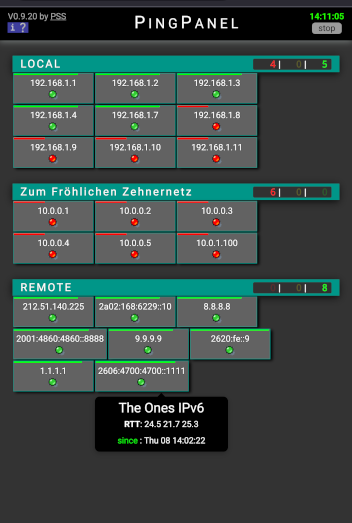
 *That will look something like this:*   
 ![ ](https://git.zweiernet.ch/sigi/pingpanel/raw/master/mcv1.png)
 
 
-If you want to use a name other than config.cfg, you can specify this in the _/etc/default/pingpanel_ file
+If you want to use a name other than config.cfg, you may specify the **CONFIG** variable in the _/etc/default/pingpanel_ file
 or using the `-c <filename>` parameter to the PingPanel.py script.
 
 All Messages are written to the file _/var/log/pingpanel.log_, unless 
@@ -112,6 +130,10 @@ _create\_server-certificate.sh_ script can create it for you, although it is onl
 The configuration files _config.cfg_ and _/etc/default/pingpanel_ will be preserved.
 New files will be given the prefix .dpkg-NEW.
 Adjust your config.cfg file with the new paramameters from .dpkg-NEW.
+   
+>With version 0.9.20 it is possible to split the config.cfg in two separate files.   
+> Keep that in mind and check the new _/etc/default/pingpanel.dpkg-NEW_ file.   
+
 
 Restart the PingPanel Daemon.
 

+ 24 - 19
changelog

@@ -1,27 +1,32 @@
-v0.9.6 / 18.7.24, sigi:
-	- Corr: handling duplicate ping answers (ICMP replys).
-	- formatting status information fileds.
-	
-v0.9.7 / 30.7.24, sigi:
-	- Acceleration: relocation of json handling from frontend to backend.
-	- some CSS cosmetics.
-	
-v0.9.8 / 12.8.24, sigi:
-	- implementing secure HTTPS connections on both, webserver and websocket.
-	- New HTTPS params in config.cfg.
-	- Changed: 'Title' param renamed to 'TitleAdd' in config.cfg as it is now an addendum to the title.
-	
-v0.9.9 / 1.4.25, sigi:
-	- Corr: configfile handling.
-	- New: fping parameter --size can now be set in PingPanel's config.cfg.
+v0.9.20 / 8.10.26, si:
+	- New:		- Parameter 'PingForever', see desc. in config.cfg
+	- Changed:	- configuration file handling, see README.
+
+v0.9.12 / 6.5.25, si:
+	- New:	- "Duration Bar", indicates how long the actual status lasts.
+			- Parameter 'DurationBarSpan' in config.cfg sets the time span of the bar.
 
 v0.9.11 / 17.4.25, si:
 	- New:	- improved debug (-v) output to fiddle better with timing parameters
 			- Consolidated status information on sections more readable
 			- Host specific tooltip now has a "since" time info
 	- Corr:	- anim_red image loop now infinite
+
+v0.9.9 / 1.4.25, sigi:
+	- Corr: configfile handling.
+	- New: fping parameter --size can now be set in PingPanel's config.cfg.
+
+v0.9.8 / 12.8.24, sigi:
+	- implementing secure HTTPS connections on both, webserver and websocket.
+	- New HTTPS params in config.cfg.
+	- Changed: 'Title' param renamed to 'TitleAdd' in config.cfg as it is now an addendum to the title.
+	
+v0.9.7 / 30.7.24, sigi:
+	- Acceleration: relocation of json handling from frontend to backend.
+	- some CSS cosmetics.
+	
+v0.9.6 / 18.7.24, sigi:
+	- Corr: handling duplicate ping answers (ICMP replys).
+	- formatting status information fileds.
 	
-v0.9.12 / 6.5.25, si:
-	- New:	- "Duration Bar", indicates how long the actual status lasts.
-			- Parameter 'DurationBarSpan' in config.cfg sets the time span of the bar.
 			

+ 13 - 4
config.cfg

@@ -13,6 +13,12 @@ ListenPort = 8888
 ## Address the Webserver is bound on:
 ListenAddr = 0.0.0.0
 
+## Normally, PingPanel stops the ping rounds, i.e. all pings, when no Web-client is connected to the server,
+## and restarts the ping cycles when the next web-client connects.
+## If you want the pings to run continuously even when no clients are connected, set this parameter to 'True'.
+## Default value is 'False'
+PingForever = False
+
 ## Using secure HTTPS conections:
 ## Using HTTPS, comment out the following three parameters.
 ## Of course, the file names are freely choosable here, relative to the current directory.
@@ -29,8 +35,8 @@ fpingCommand = fping
 ##- from manpage - The minimum amount of time (in milliseconds) between sending a ping packet to any target
 ##- from manpage - (default is 10, minimum is 1).
 ## Increasing this value has a major impact on the runtime of a single ping round when a high number of hosts are pinged.
-## PingPanel default is 1.
-Fping-interval = 1
+## PingPanel default is 2.
+Fping-interval = 2
 
 ## Fping-period:
 ##- from manpage - This parameter sets the time in milliseconds that fping waits between successive
@@ -72,7 +78,10 @@ FlashThreshold = 3
 ## The unit is seconds.
 DurationBarSpan = 3600
 
-#-- User specified sections follow
+
+
+#-- User specified sections follow 
+## ( -- Since v0.9.20, the following sections can be moved to a separate sections.cfg file -- )
 ## The following sections consist of a section name followed by IP-Addresses with an associated comment.
 ## The section name must be in square brackets and is case-sensitive. At least one section name must exist.
 ## IP-Addresses can be in IPv4 or in IPv6 format and are delimited by an equal-sign (=) from comment.
@@ -86,7 +95,7 @@ DurationBarSpan = 3600
 192.168.1.3		= Three
 192.168.1.4		= Four
 192.168.1.7		= Seven
-192.168.1.8		= Eight
+192.168.1.8	= Eight
 192.168.1.9	= 
 192.168.1.10	= Router Number Ten
 192.168.1.11	= Switch Number Eleven

+ 5 - 0
etc.example/default/pingpanel

@@ -7,6 +7,11 @@
 # Configfile (Standard: config.cfg)
 CONFIG=/opt/PingPanel/config.cfg
 
+# User specific Sections and Addresses File
+# Only and only if this parameter is set then this sections are used.
+# This also means that, in the default config file (CONFIG=), only the [Main] section is valid.
+#USER_SECT_FILE=/opt/PingPanel/sections.cfg
+
 # the path to logfile
 LOGFILE=/var/log/pingpanel.log
 

+ 2 - 2
etc.example/init.d/pingpanel

@@ -30,11 +30,11 @@ set -e
 
 [ -f "/etc/default/$NAME" ] && . /etc/default/$NAME
 
-PINGPANEL_OPTS="-c $CONFIG $PINGPANEL_OPTS"
+PINGPANEL_OPTS="-c $CONFIG ${USER_SECT_FILE:+-s ${USER_SECT_FILE}} $PINGPANEL_OPTS"
 
 case "$1" in
   start)
-    log_daemon_msg "Starting $DESC" "$NAME"
+    log_daemon_msg "Starting $DESC" "$NAME  PID:"
 	
 	start_daemon /usr/bin/python3 -u $DAEMON $PINGPANEL_OPTS 1>>$LOGFILE 2>>$LOGFILE &
 

BIN
mcv1.png


BIN
ppb.png


+ 40 - 0
sections.cfg

@@ -0,0 +1,40 @@
+
+#-- User specified sections follow
+## The following sections consist of a section name followed by IP-Addresses with an associated comment.
+## The section name must be in square brackets and is case-sensitive. At least one section name must exist.
+## IP-Addresses can be in IPv4 or in IPv6 format and are delimited by an equal-sign (=) from comment.
+## Everything after the equal-sign is considered a comment. HTML-Tags are allowed in comment, but be careful
+## not to overload the page.
+## The comment can be omitted.
+## Leading and trailing whitespace is removed from comment and IP-Address by the program.
+[LOCAL]
+192.168.1.1		= One
+192.168.1.2		= Two
+192.168.1.3		= Three
+192.168.1.4		= Four
+192.168.1.7		= Seven
+192.168.1.8		= Eight
+192.168.1.9	= 
+192.168.1.10	= Router Number Ten
+192.168.1.11	= Switch Number Eleven
+
+
+[Zum Fröhlichen Zehnernetz]
+10.0.0.1    = happy 1
+10.0.0.2    = happy 2
+10.0.0.3    = happy 3
+10.0.0.4    = happy 4
+10.0.0.5    = happy 5
+10.0.1.100  = 
+
+
+[REMOTE]
+212.51.140.225			= <span style="color: yellow">ZweierNet.ch</span>
+2a02:168:6229::10		= <span style="color: blue">ZweierNet.ch IPv6</span>
+8.8.8.8					= The Quad Eight
+2001:4860:4860::8888 	= Quad Eight IPv6
+9.9.9.9					= The Nines
+2620:fe::9				= The Nines IPv6
+1.1.1.1					= The One and One and One and One
+2606:4700:4700::1111 	= The Ones IPv6
+

Certains fichiers n'ont pas été affichés car il y a eu trop de fichiers modifiés dans ce diff