|
@@ -35,6 +35,14 @@ and install the dependencies with:
|
|
|
`apt --fix-broken install`
|
|
`apt --fix-broken install`
|
|
|
|
|
|
|
|
Afterwards the pingpanel package ist fully instsalled under /opt/PingPanel/.
|
|
Afterwards the pingpanel package ist fully instsalled under /opt/PingPanel/.
|
|
|
|
|
+The system related startup files are _/etc/init.d/pingpanel_ and _/etc/default/pingpanel_.
|
|
|
|
|
+
|
|
|
|
|
+The daemon startup file is in standard LSB format for SysV systems.
|
|
|
|
|
+So, on systemd related systems at least use:
|
|
|
|
|
+`systemctl daemon-reload`
|
|
|
|
|
+
|
|
|
|
|
+After all, start the PingPanel Daemon:
|
|
|
|
|
+`service pingpanel start`
|
|
|
|
|
|
|
|
|
|
|
|
|
**On other systems using the tar-archive:**
|
|
**On other systems using the tar-archive:**
|
|
@@ -42,14 +50,11 @@ Afterwards the pingpanel package ist fully instsalled under /opt/PingPanel/.
|
|
|
```
|
|
```
|
|
|
cd /opt
|
|
cd /opt
|
|
|
tar xvfz pingpanel_<version>.tar.gz
|
|
tar xvfz pingpanel_<version>.tar.gz
|
|
|
-```
|
|
|
|
|
-
|
|
|
|
|
|
|
+```
|
|
|
|
|
|
|
|
Further information about installation and configuration can be found in the INSTALL.txt file.
|
|
Further information about installation and configuration can be found in the INSTALL.txt file.
|
|
|
-
|
|
|
|
|
-
|
|
|
|
|
-### Usage
|
|
|
|
|
- The directory _etc.example/_ contains startup file in _init.d/_ and a default _pingpanel_ file under _default/_.
|
|
|
|
|
|
|
+
|
|
|
|
|
+The directory _etc.example/_ contains startup file in _init.d/_ and a default _pingpanel_ file under _default/_.
|
|
|
If you want to use a different installation directory, you must adjust the default file
|
|
If you want to use a different installation directory, you must adjust the default file
|
|
|
and/or the init.d startup script to the appropriate pathes and names.
|
|
and/or the init.d startup script to the appropriate pathes and names.
|
|
|
|
|
|
|
@@ -62,34 +67,47 @@ After all, start the PingPanel Daemon:
|
|
|
|
|
|
|
|
### Configuration
|
|
### Configuration
|
|
|
|
|
|
|
|
-The application is controlled via a configuration file in which the hosts to be pinged are listed and named
|
|
|
|
|
-in freely selectable blocks, the loop- and fping-related parameters are defined and the application behavior can be set.
|
|
|
|
|
-The configuration is made in the _config.cfg_ file located in the installation directory.
|
|
|
|
|
|
|
+The application is controlled via a configuration file (default: _config.cfg_), in which the application behaviour and
|
|
|
|
|
+fping-related parameters are defined in a [Main] block/section, whilst the hosts to be pinged are specified and named
|
|
|
|
|
+in further freely definable blocks/sections [...].
|
|
|
All parameters like `ListenAddr`, `CertFile`, `LoopInterval`, fping-related params etc. are well documented in this file.
|
|
All parameters like `ListenAddr`, `CertFile`, `LoopInterval`, fping-related params etc. are well documented in this file.
|
|
|
|
|
+
|
|
|
|
|
+As of version 0.9.20, the configurations for [Main] and the user-defined sections [...] can be split into two separate files.
|
|
|
|
|
+If two separate files, _config.cfg_ and _sections.cfg_, are used, only the [Main] block is taken from the _config.cfg_ file
|
|
|
|
|
+whilst the custom sections [...] are read from a sections-configuration file like _sections.cfg_.
|
|
|
|
|
+Otherwise, if only one config file is present, all blocks/sections are read from this _config.cfg_ file.
|
|
|
|
|
+To use the separate-config-file concept, either use the command-line parameter `-s <sections-file>` or set the
|
|
|
|
|
+**USER_SECT_FILE** variable in the _/etc/default/pingpanel_ file (see there).
|
|
|
|
|
+
|
|
|
|
|
|
|
|
-*Example of blocks and its hosts configurtion:*
|
|
|
|
|
|
|
+*Example of user-defined sections [...] and its hosts configurtion:*
|
|
|
```
|
|
```
|
|
|
[LOCAL]
|
|
[LOCAL]
|
|
|
-192.168.1.1 = One
|
|
|
|
|
-192.168.1.2 = Two
|
|
|
|
|
-192.168.1.3 = Three
|
|
|
|
|
-192.168.1.4 = Four
|
|
|
|
|
-....
|
|
|
|
|
|
|
+192.168.1.1 = One
|
|
|
|
|
+192.168.1.2 = Two
|
|
|
|
|
+192.168.1.3 = Three
|
|
|
|
|
+...
|
|
|
|
|
+
|
|
|
[Zum Fröhlichen Zehnernetz]
|
|
[Zum Fröhlichen Zehnernetz]
|
|
|
10.0.0.1 = happy 1
|
|
10.0.0.1 = happy 1
|
|
|
10.0.0.2 = happy 2
|
|
10.0.0.2 = happy 2
|
|
|
...
|
|
...
|
|
|
|
|
+
|
|
|
[REMOTE]
|
|
[REMOTE]
|
|
|
-212.51.140.225 = <span style="color: yellow">ZweierNet.ch</span>
|
|
|
|
|
-2a02:168:6229::10 = <span style="color: blue">ZweierNet.ch IPv6</span>
|
|
|
|
|
-8.8.8.8 = The Quad Eight
|
|
|
|
|
-...
|
|
|
|
|
|
|
+212.51.140.225 = <span style="color: yellow">ZweierNet.ch</span>
|
|
|
|
|
+2a02:168:6229::10 = <span style="color: blue">ZweierNet.ch IPv6</span>
|
|
|
|
|
+8.8.8.8 = The Quad Eight
|
|
|
|
|
+2001:4860:4860::8888 = Quad Eight IPv6
|
|
|
|
|
+9.9.9.9 = The Nines
|
|
|
|
|
+2620:fe::9 = The Nines IPv6
|
|
|
|
|
+1.1.1.1 = The One and One and One and One
|
|
|
|
|
+2606:4700:4700::1111 = The Ones IPv6
|
|
|
```
|
|
```
|
|
|
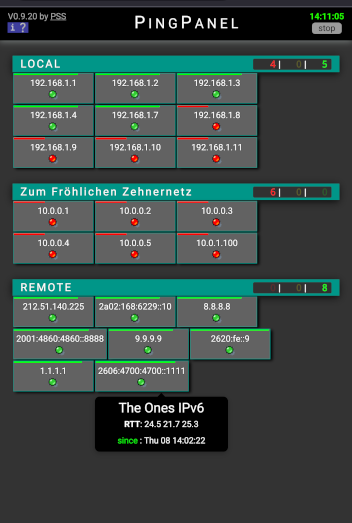
*That will look something like this:*
|
|
*That will look something like this:*
|
|
|

|
|

|
|
|
|
|
|
|
|
|
|
|
|
|
-If you want to use a name other than config.cfg, you can specify this in the _/etc/default/pingpanel_ file
|
|
|
|
|
|
|
+If you want to use a name other than config.cfg, you may specify the **CONFIG** variable in the _/etc/default/pingpanel_ file
|
|
|
or using the `-c <filename>` parameter to the PingPanel.py script.
|
|
or using the `-c <filename>` parameter to the PingPanel.py script.
|
|
|
|
|
|
|
|
All Messages are written to the file _/var/log/pingpanel.log_, unless
|
|
All Messages are written to the file _/var/log/pingpanel.log_, unless
|
|
@@ -112,6 +130,10 @@ _create\_server-certificate.sh_ script can create it for you, although it is onl
|
|
|
The configuration files _config.cfg_ and _/etc/default/pingpanel_ will be preserved.
|
|
The configuration files _config.cfg_ and _/etc/default/pingpanel_ will be preserved.
|
|
|
New files will be given the prefix .dpkg-NEW.
|
|
New files will be given the prefix .dpkg-NEW.
|
|
|
Adjust your config.cfg file with the new paramameters from .dpkg-NEW.
|
|
Adjust your config.cfg file with the new paramameters from .dpkg-NEW.
|
|
|
|
|
+
|
|
|
|
|
+>With version 0.9.20 it is possible to split the config.cfg in two separate files.
|
|
|
|
|
+> Keep that in mind and check the new _/etc/default/pingpanel.dpkg-NEW_ file.
|
|
|
|
|
+
|
|
|
|
|
|
|
|
Restart the PingPanel Daemon.
|
|
Restart the PingPanel Daemon.
|
|
|
|
|
|